How Third-Party Fulfillment Works on Shopify: Setup and Statuses
Quick answer: A third-party fulfillment company (3PL) connects to Shopify through an app that registers it as a fulfillment service, which appears in your store as its own location. Products assigned to that location are handled by the 3PL. When an order is paid, Shopify sends the 3PL a fulfillment request and the order shows In progress; the 3PL accepts it and ships, and once tracking comes back the order turns Fulfilled. If the 3PL declines the request, the order drops back to Unfulfilled with a note explaining why.
The moving parts inside Shopify
Shopify doesn't send orders to a 3PL by email or spreadsheet. Three building blocks do the work:
- Fulfillment service. The 3PL's app registers it in your store. It shows up as a location that you don't manage yourself, next to your own address or stockroom.
- Location assignment. Every product or variant is stocked at one or more locations. Items assigned to the 3PL's location go to the 3PL; everything else stays with you.
- Fulfillment orders and requests. When an order comes in, Shopify splits it by location into fulfillment orders. For the 3PL's share, a fulfillment request is sent, either automatically when the order is paid or when you click Request fulfillment on the order.
The 3PL can accept or decline each request. Once it has accepted, you can't cancel outright anymore: you send a cancellation request, and the 3PL either accepts it or rejects it and carries on with the order.
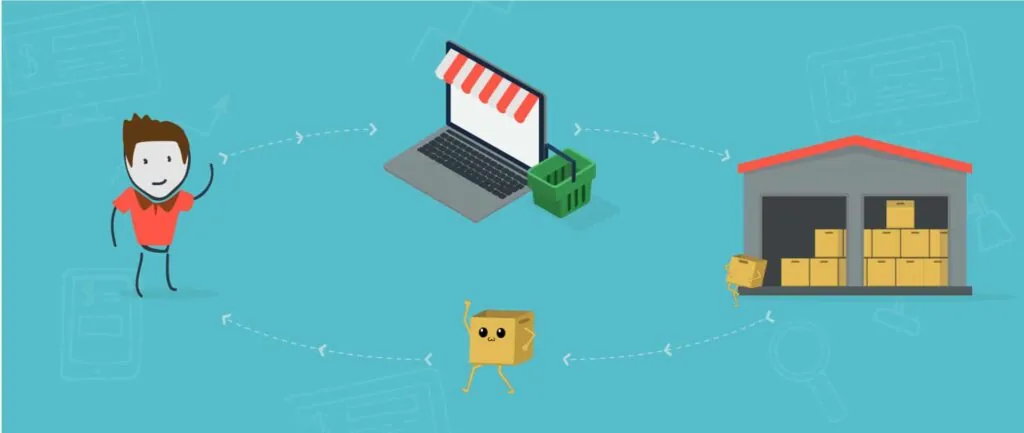
How an order's status changes, stage by stage
| Stage | What you see in Shopify | What is happening |
|---|---|---|
| 1. Customer pays | Unfulfilled | The order exists; no request has gone to the 3PL yet, or one is about to. |
| 2. Request sent | In progress (detail: Requested) | Shopify has asked the 3PL to fulfill its items. From here you can no longer edit the order or refund items. |
| 3. 3PL accepts | In progress (detail: Accepted) | The warehouse has taken the order on and is buying, picking or packing it. |
| 3b. 3PL declines | Unfulfilled, with a note | The 3PL couldn't take it, for example because of missing stock. The reason is logged on the order timeline. |
| 4. Some items shipped | Partially fulfilled | Part of the order has shipped; the rest is waiting, often at another location. |
| 5. Everything shipped | Fulfilled | All items are out. The 3PL's tracking is added to the order automatically, and Shopify can email the customer a shipping confirmation. |
Two more statuses can turn up. On hold is set by you or an app, for example while a high-risk order is reviewed, and blocks fulfillment until the hold is released. Fulfillment not required marks orders that were canceled or fully refunded before anything shipped.
Setting it up
- Connect the 3PL's app and approve the access it asks for. This creates the fulfillment service location.
- Assign products to that location. Start with one or two products if you're testing.
- Link every variant to the 3PL's SKU, so "Blue / Large" in your store is the same item on their shelf.
- Link shipping methods. Each rate you show at checkout, such as Standard or Express, should point to a real shipping line at the 3PL, with a delivery promise that line can keep.
- Check your shipping profiles. Shopify adds a fulfillment app to your shipping settings by itself only if you use the general profile with no per-location rates. Otherwise, add it yourself.
- Use automatic fulfillment, so a request goes out the moment an order is paid and nobody has to click anything.
- Fund the account if the 3PL works on a prepaid balance.
- Place a test order and watch it pass through every status in the table above.
Why orders get stuck, and where to look
| Symptom | Likely cause | Fix |
|---|---|---|
| Stays Unfulfilled with no request on the timeline | Product not assigned to the 3PL location, or automatic requests are off | Assign the variant; send the request by hand |
| Back to Unfulfilled with a note | 3PL declined: no stock, unlinked SKU, address problem | Read the note, fix the cause, request again |
| In progress for days | Accepted but waiting on purchasing, or on your prepaid balance | Ask the 3PL; check your balance |
| Partially fulfilled | Items split across locations, or one item out of stock | Check each item's location and stock level |
| No "Mark as fulfilled" button | Shopify hides it on orders assigned to a fulfillment service location | To ship it yourself, move the order to a location you manage first |
| On hold | You or an app placed a hold, such as a fraud review | Review the order and release the hold |
More fixes for the first row are in our guide to Shopify orders stuck on unfulfilled, and every order, payment and fulfillment status is listed in Shopify order status explained.
One detail that matters: when tracking is pushed
An order turns Fulfilled when the 3PL creates the fulfillment and attaches tracking. Some setups do that the moment a label is printed, before the parcel has moved. Your customer then gets a shipping email for a parcel still sitting on a shelf, the tracking page shows nothing for days, and your delivery-time reports start from the wrong date. Ask any 3PL whether tracking goes to Shopify at label creation or at physical dispatch. If your 3PL ships from China, also ask whether the customer will see the local carrier's tracking or only the international leg. What happens to the order between those statuses, from purchasing to customs, is covered in dropshipping order fulfillment.
How PackQuay connects to Shopify
Connecting your Shopify store to PackQuay is free, with no subscription and no fixed-term contract. Paid orders are picked, inspected, packed and shipped without manual approval, and tracking reaches Shopify only once the parcel has physically left our warehouse. We set the shipping line per product and can attach branded packaging to any product. WooCommerce stores connect with a REST API key, and other platforms can send orders as a CSV or Excel file. Your account manager on WhatsApp will set it up with you; the details are on our Shopify fulfillment page.
FAQ
How does third-party fulfillment work on Shopify?
You connect the 3PL's app, which registers the 3PL as a fulfillment service with its own location in your store. Paid orders for products stocked at that location turn into fulfillment requests; the 3PL ships them and returns tracking, and Shopify then marks the order Fulfilled.
What does In progress mean on a Shopify order?
For orders handled by a fulfillment service, it means a fulfillment request has been sent to the 3PL; the detailed status shows whether it is Requested or Accepted. It changes to Fulfilled once every item has shipped.
What happens if the 3PL declines a fulfillment request?
The order goes back to Unfulfilled, and the 3PL can add a note explaining why, which appears on the order timeline. Fix the cause, such as stock or SKU linking, and request fulfillment again.
Can I cancel a Shopify order after the 3PL has accepted it?
Not directly. You send a cancellation request, and the 3PL either accepts it or rejects it and continues fulfilling the order, for example if the parcel has already been packed.
Can I fulfill some products myself and send others to a 3PL?
Yes. Assign only the products you want the 3PL to handle to its location, and everything else keeps shipping from locations you manage. Shopify splits mixed orders by location on its own.